Accurate data or analytics is the essential for the growth of a website and making the proper marketing decisions. But in today’s digital ecosystem of 2026, referral spam or fraudulent bot traffic is a huge issue for many business owners and marketers.
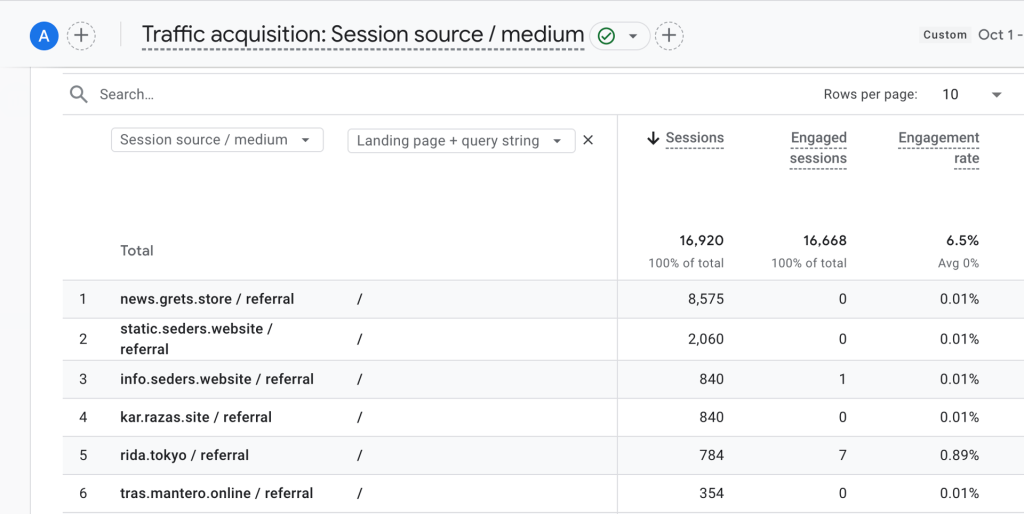
Your Google Analytics 4 (GA4) dashboard may be showing thousands of visitors but in reality, you are not getting any sales/leads! If you are also seeing such odd traffic on your website, you need to be vigilant right now.
Today I, BDS BULBUL AHMED (Senior SEO Consultant) will share about my lengthy 6 years expertise and my BDS team’s Proven Technical SEO Methodology: How to Block This Harmful Spam Traffic at GA4, Cloudflare and Server level forever.
1. How does spam or phony traffic influence your business?
If your site contains referral spam or phony bot traffic, it seriously impacts your business’ ability to make the proper decisions and performance:
- Faulty or bad analytics: Spam visitors is hitting your site but they’re not buying anything or signing up for anything either. So your actual conversion rate seems artificially very low.
- Impact on user metrics: Besides, these bots are coming to the site right away, which makes the bounce rate unusually increased and the average session duration (Avg Session Duration) is 1 second or less, which reduces the average session time of your legitimate users to data.
- Server and performance loss: When thousands of spam bots come onto a website at a time, it creates extra load on the server and makes the site slow for normal visitors. If your hosting bandwidth is limited the site may go down or crash resulting in rise in the hosting bill without your knowledge.
- Wasting marketing budget: When you look at the wrong data you may think that there is a lot of traffic coming from a particular source and there will be more advertising but that traffic was spam. Even if you are doing a re-targeting or remarketing campaign (Remarketing Ads), your valuable money will go down the drain on these bogus spam bots.
2. In GA4, this traffic is filtered by basically following two primary steps:
a) Find the spam source
- Sign in to your GA4 account.
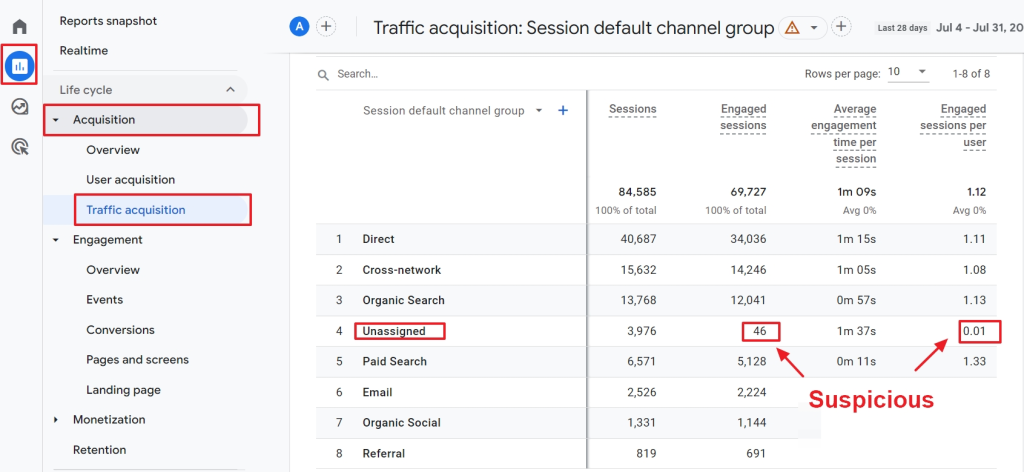
- In the left menu, navigate to Reports > Acquisition > Traffic acquisition.
- Change Primary Dimension, pick Session source.
- Flag any weird or unknown domains as suspicious (for example, semalt.com, buttons-for-website.com, or a range of malware sites).
b) Development of Data Filters
GA4 doesn’t allow us to eliminate any traffic source directly. But we can block undesired referrals using data filters:
- Click on Admin (gear icon) on the bottom left corner.
- From the Data collection menu, choose Data Filters.
- Choose Create filter and then Session filter.
- Type a name for the filter (e.g. Referral Spam Blocker).
- Choose session _ source as argument.
- Select the option does not match regex as condition.
- In the Value box, enter your recognized spam domains with a symbol (e.g.
spamdomain1\. com|spamdomain2\ .com). - Turn on the filter function and save.
BDS Expert Tip:
Sometimes data is destroyed not just by spam, but also by internal traffic or developer activity. To do this, go to Data Streams, choose your stream, then Configure tag settings > Define internal traffic. Type in a given IP address, then enable the internal traffic filters.
3. Pro-Level Security: Block at Cloudflare and Server level
Google Analytics filters the spam at the Cloudflare and Server level, which is the perfect place to prevent it at the Cloudflare or Server level. It saves your server bandwidth and also maintains the data accurate.
1. Blocked by Cloudflare WAF
You can prevent specific spam bots before they even get into your site, using Cloudflare’s Web Application Firewall (WAF):
- Go to Security > WAF > Custom Rules and click Create Rule.
- Select Referrer for the field, Operator includes, and then type the spam domain name in the Value (e.g. semalt.com). If there are more than one domain add it with OR.
- Select Block from Choose action and deploy the rule.
- Go to Security > Bots and turn on Bot Fight Mode. It will automatically challenge or ban known spam bots and dangerous scripts.
- Managed Challenge: Choose this if you have more traffic coming from a specific country or a dubious source, but you do not want to ban it directly. This way only real people can access the site through the captcha.
2. Server level Blocking (via .htaccess file)
If you’re running your site on an Apache server (cPanel hosting for example), you can prevent spam referrals directly on the server level by adding code into the .htaccess file. You can add the following code to the .htaccess Apache:
Apache
# Block Referral Spam
RewriteEngine On
RewriteCond %{HTTP_REFERER} semalt\.com [NC,OR]
RewriteCond %{HTTP_REFERER} buttons-for-website\.com [NC,OR]
RewriteCond %{HTTP_REFERER} spamdomain3\.com [NC]
RewriteRule .* - [F]
(Just use [NC] instead of [NC, OR] for the last domain. Change the domain name to suit your needs.)
3. WordPress Plugins to use with Cloudflare
If you have a WordPress website, here are the plugins you can use with Cloudflare:
- Wordfence Security: It tracks traffic in real time and instantly bans known spam IPs and referral sources.
- Blackhole for Bad Bots: This plugin places a secret trap on the site and permanently disables any spam bots that are caught in that trap.
Are you worried about the security of your website?
Running a marketing campaign with the wrong data is like throwing money and time away in the dark. If you want to master your website’s data tracking, increase genuine conversions by minimizing bounce rate, and scale your business to keep up with the latest algorithms in 2026 – then you need an expert technical SEO partner.
To date, my BDS team and I have executed more than 250 global projects. You can visit our official website bdsbulbulahmed.com today to get a custom and entirely free technical SEO and spam audit report for your business.
We’re on your road to digital-success!